About Syncing
CalendarBridge syncs events (and updates to those events) from one calendar to another according to a user-defined set of rules, which we call a “sync connection.”
Here is a quick video of setting up syncing between a Google and an Outlook calendar. The process is the same for syncing two Google calendars and for syncing two Outlook calendars.
CalendarBridge syncs events (and updates to those events) from one calendar to another calendar according to a user-defined set of rules, which we call a “sync connection.”
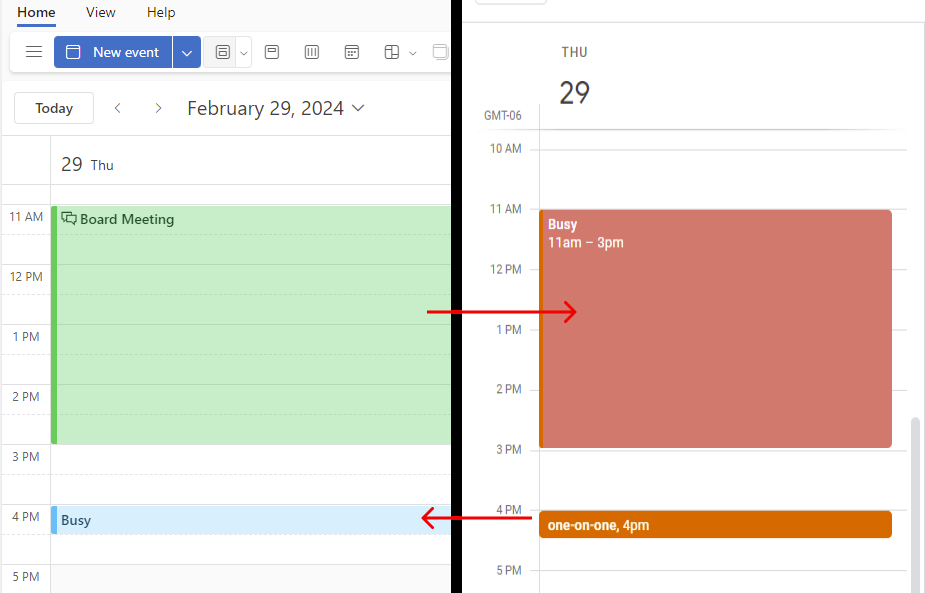
Each sync connection is a one-way connection between a source calendar and a destination calendar. When an event is created, edited, or canceled on the source calendar, CalendarBridge creates, edits, or cancels a corresponding event copy on the destination calendar.
Event copies should be treated as read-only. Edits to event copies on the destination calendar are not synced back to the source calendar — this is to ensure your original events are never corrupted in any way.
CalendarBridge does not make copies of its own copies. This is to avoid looping, and just confusion in general. See How Many Sync Connections Do I Need?
Each sync connection has user-controlled settings to dictate the color and subject of event copies, to help the user distinguish their native events from event copies created by CalendarBridge.
Each sync connection has a number of user-controlled settings that dictate which information is synced from the source calendar to the destination calendar. A sync connection can sync no information about the event (in which case the event copy will simply be an event titled “busy” or “free”), or can sync one or more of subject, description, location, web conference information, and attendees.
Sync frequency depends on the type of source calendar
For Google and Microsoft source calendars, syncing is real-time. CalendarBridge continuously listens for activity on the source calendar and syncs any updates within a minute or two.
For iCloud and Internet (ICS URL) source calendars, CalendarBridge checks the source calendar for updates every 5 to 10 minutes.
CalendarBridge does not impose any limits on how many events can be synced over a sync connection.
How to get started?
Individual users should follow the Getting Started Guide. Group administrators should start by determining which type of group license they need.