Declined events in Google Calendar
How to hide declined events in Google Calendar, and how CalendarBridge syncs declined Google events to your other calendars.
Google Calendar keeps events on your calendar after you decline them, which is why so many people go looking for how to hide declined events in Google Calendar. That is a Google setting, not a CalendarBridge one, and it affects what CalendarBridge sees when it syncs.
How to hide declined events in Google Calendar
- Open Google Calendar on your computer.
- Click the Settings gear, then Settings.
- Under View options, clear the Show declined events checkbox.
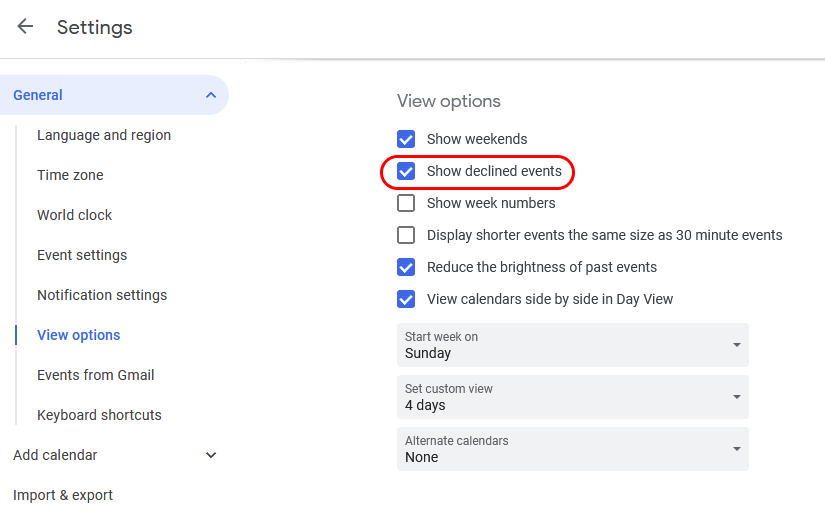
Turning the setting back on shows them again. The setting changes only your own view — it does not remove the event from the calendar, and it does not notify the organizer.
How CalendarBridge syncs declined events
CalendarBridge cannot see whether you have chosen to hide declined events. Google does not expose that preference, so CalendarBridge syncs declined Google events and prepends a “Declined:” prefix to the subject of the event copy. That way a declined meeting never silently blocks time on your destination calendar without telling you why.
If you delete the declined event from the source calendar, the “Declined:” event copy is deleted too on the next sync.
If you do not want declined events on your other calendars
Deleting the declined event from the Google source calendar is the reliable way to keep it off your destination calendars. Hiding declined events in Google’s view options is not enough, because the event still exists on the calendar and CalendarBridge still reads it.
Changes propagate on the normal schedule — see how often calendars sync. If a “Declined:” copy is still showing after that, resync the sync connection.
Related
- Duplicate events — when the same event appears more than once.
- Hide event copies in Outlook.
- Privacy settings for event copies — control what detail is copied across.